10 Beste Gaming-Monitore
Von führenden Marken und Bestsellern, die im Internet erhältlich sind.
Ähnliche Produkte
Bis zu 40 % Rabatt

Unsere Top-Auswahl
Gewinner
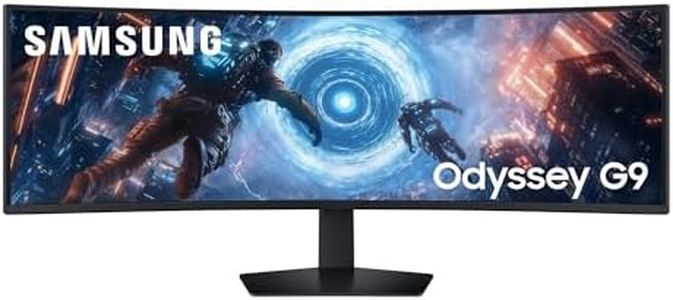
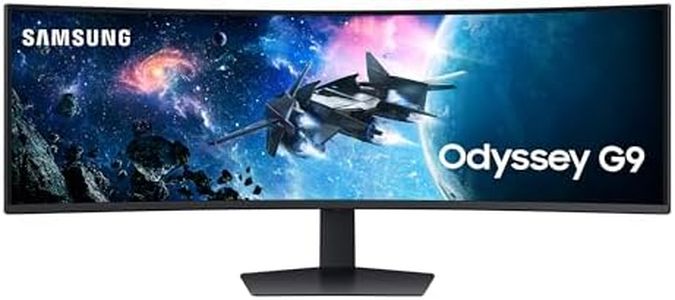
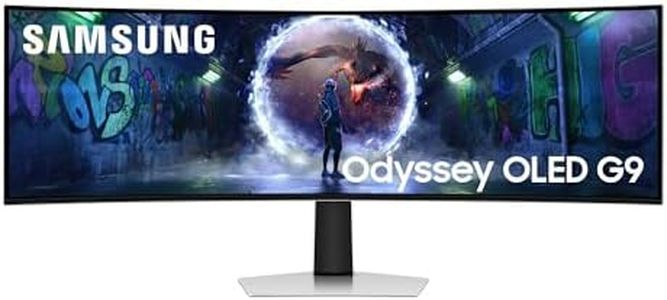
Samsung 49 Zoll Odyssey OLED G9 G93SD, DQHD (5.120 x 1.440), Gaming Monitor, PC Bildschirm, 240 Hz, OLED Glare Free, 0,03 ms Reaktionszeit, Gaming Hub, LS49DG934SUXEN
 Samsung
The Samsung Odyssey OLED G9 is a top-tier gaming monitor designed to impress serious gamers who want a wide, immersive experience. Its massive 49-inch curved OLED screen offers a sharp Dual QHD resolution (5120 x 1440), which means you get a very wide view with rich, vivid colors and deep blacks thanks to OLED technology. The 240 Hz refresh rate and extremely fast 0.03 ms response time ensure games run smoothly with minimal blur or lag, making it excellent for fast-paced action. FreeSync Premium Pro support helps reduce screen tearing and stuttering for a fluid picture. The matte, glare-free screen reduces annoying reflections, even in bright rooms, which is great for longer gaming sessions.
Connectivity is solid with DisplayPort, HDMI, and USB-C ports, so you can easily hook up a variety of devices including PCs and consoles. The built-in Gaming Hub is a nice touch, letting you access streaming and games without switching devices. On the downside, the brightness at 250 cd/m² is a bit modest compared to some LCD monitors, which might affect visibility in very bright environments. Also, the large 49-inch ultrawide format is fantastic for immersive play but might not fit smaller desks or spaces comfortably.
This monitor excels if you want a premium, smooth, and colorful gaming setup with plenty of screen space, especially if you play fast, competitive games or enjoy visually rich titles.
ASUS ROG Strix WOLED XG32UCWG - 32 Zoll 4K UHD Gaming Monitor - Dual-Modus 4K bei 165 Hz FHD bei 330 Hz, 0.03ms, Sync-Tech, HDR 400 TB - 16:9, 3840x2160, DP, HDMI, 15W USB-C, USB-Hub, Ergo
Der ASUS ROG Strix WOLED XG32UCWG ist ein 32 Zoll großer Gaming-Monitor mit einer beeindruckenden 4K-Auflösung (3840 x 2160), die sehr scharfe und detailreiche Bilder liefert – ideal für Spiele mit vielen Details und auch für Bild- oder Videobearbeitung. Das OLED-Panel sorgt für besonders satte Farben, tiefes Schwarz und einen sehr guten Kontrast, was das Spielerlebnis visuell stark verbessert. Die Bildwiederholfrequenz liegt bei 165 Hz, was flüssiges Spielen ermöglicht, und die extrem schnelle Reaktionszeit von nur 0,03 ms hilft, Bewegungsunschärfen zu vermeiden – wichtig für schnelle Games. Zudem unterstützt der Monitor G-Sync, eine Technologie, die Bildschirmrisse reduziert und das Bild besonders glatt wirken lässt.
Besonders praktisch ist der Dual-Modus, der neben der 4K-Auflösung auch einen Full-HD-Modus mit bis zu 330 Hz bietet, falls man in schnellen Spielen eine noch höhere Bildrate bevorzugt. Für die Größe von 32 Zoll ist das Seitenverhältnis 16:9 sehr passend und das glänzende TrueBlack Glossy-Panel bietet eine blendfreie Oberfläche, was auch bei längeren Spielsessions angenehm ist. Anschlussseitig bietet der Monitor vielseitige Optionen mit DisplayPort, HDMI 2.1 und USB-C, inklusive 15 Watt Power Delivery, was moderne Geräte gut verbindet.
Ein kleiner Nachteil ist die glänzende Oberfläche, die je nach Umgebungslicht zu Spiegelungen führen kann, außerdem ist die Helligkeit mit HDR 400 zwar gut, aber für sehr helle Räume könnte es etwas stärker sein. Die integrierte KI-Unterstützung mit dynamischem Fadenkreuz und Schattenverstärkung ist ein nettes Extra, das das Gaming-Erlebnis noch etwas verbessert. Mit einer drei Jahre Herstellergarantie und einem Gewicht von knapp über 7 kg ist der Monitor gut verarbeitet und langlebig. Der Monitor eignet sich besonders für Spieler, die Wert auf hohe Bildqualität, flüssige Darstellung und moderne Features legen, sowie für kreative Nutzer, die mit 4K und echten Farben arbeiten wollen.
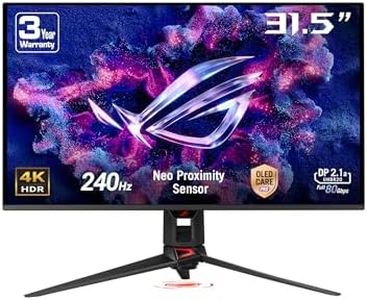
ASUS ROG Swift OLED PG32UCDMR 32 Zoll 4K UHD Gaming Monitor (240 Hz, 0.03ms GtG, G-Sync, FreeSync, AdaptiveSync, 10-bit, DisplayHDR 400, 16:9, 3840x2160, DP 2.1, HDMI 2.1, 90W USB-C, USB-Hub)
Der ASUS ROG Swift OLED PG32UCDMR ist ein 32-Zoll-Gaming-Monitor mit einer beeindruckenden 4K-UHD-Auflösung (3840x2160) und einer extrem schnellen Bildwiederholrate von 240 Hz. Durch die OLED-Technologie bietet er tiefes Schwarz und ein extrem hohes Kontrastverhältnis, was Spiele optisch sehr lebendig macht. Die Reaktionszeit von nur 0,03 ms sorgt dafür, dass Bewegungen flüssig und ohne störende Schlieren dargestellt werden, was besonders bei schnellen Spielen ein großer Vorteil ist. Adaptive Sync-Technologien wie G-Sync und FreeSync sind integriert, damit das Bild auch bei wechselnden Bildraten stabil und ruckelfrei bleibt.
Was den Anschluss betrifft, punktet der Monitor mit modernen Schnittstellen wie DisplayPort 2.1, HDMI 2.1 und einem USB-C-Anschluss mit 90 Watt Power Delivery – ideal für vielseitige Nutzung und einfache Verbindung zu aktuellen Gaming-PCs und Konsolen. Mit DisplayHDR 400 True Black unterstützt er HDR-Inhalte, was Farben und Helligkeit realistischer macht, auch wenn es nicht die höchste HDR-Klasse ist. Ein praktisches Extra ist der Neo Proximity Sensor, der den Bildschirm schwarz schaltet, wenn man sich entfernt, um Einbrenneffekte der OLED-Technologie zu vermindern.
Ein möglicher Nachteil ist der vergleichsweise hohe Preis sowie das potenzielle Risiko des Einbrennens bei OLED-Displays, obwohl ASUS spezielle Funktionen implementiert hat, um dem entgegenzuwirken. Dieser Monitor richtet sich an anspruchsvolle Gamer, die großen Wert auf hervorragende Bildqualität, schnelle Reaktionszeiten und modernste Technik legen – insbesondere bei 4K-Gaming und HDR-Spielen.
Top-Auswahl vergleichen
Samsung 49 Zoll Odyssey OLED G9 G93SD, DQHD (5.120 x 1.440), Gaming Monitor, PC Bildschirm, 240 Hz, OLED Glare Free, 0,03 ms Reaktionszeit, Gaming Hub, LS49DG934SUXEN Auf Amazon ansehen | ASUS ROG Strix WOLED XG32UCWG - 32 Zoll 4K UHD Gaming Monitor - Dual-Modus 4K bei 165 Hz FHD bei 330 Hz, 0.03ms, Sync-Tech, HDR 400 TB - 16:9, 3840x2160, DP, HDMI, 15W USB-C, USB-Hub, Ergo Auf Amazon ansehen | ASUS ROG Swift OLED PG32UCDMR 32 Zoll 4K UHD Gaming Monitor (240 Hz, 0.03ms GtG, G-Sync, FreeSync, AdaptiveSync, 10-bit, DisplayHDR 400, 16:9, 3840x2160, DP 2.1, HDMI 2.1, 90W USB-C, USB-Hub) Auf Amazon ansehen |
|---|---|---|
| Angebot | ||
| - | - | - |
| Ausgewählt von | ||
| 1.352 | 1.250 | 1.148 |
| Mehrere Stile verfügbar | ||
| Refresh Rate | ||
| 240 Hz | 165 Hz | 240 Hz |
| Response Time | ||
| 0.03 ms | 0,03 ms | 0,03 ms |
| Panel Type | ||
| OLED | OLED | OLED |
| Resolution | ||
| 5120 x 1440 | 3840 x 2160 | 3840 x 2160 |
| Adaptive Sync Technology | ||
| FreeSync Premium Pro | G-Sync | G-Sync, FreeSync |
| Size and Curvature | ||
| 49-inch curved | 32 Zoll, flach | 31,5 Zoll, Flach |
| Connectivity | ||
| DisplayPort, HDMI, USB-C | DisplayPort, HDMI 2.1, USB-C | DisplayPort 2.1, HDMI 2.1, USB-C |