10 Beste Grafik-Tablets
Von führenden Marken und Bestsellern, die im Internet erhältlich sind.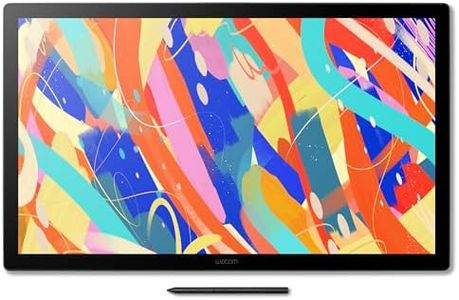
Ähnliche Produkte
Bis zu 15 % Rabatt

Empfohlene Listen

Tablets
Unsere Top-Auswahl
Gewinner
Wacom Cintiq 24 (2025 Edition) – 2.5K Grafik-Stiftdisplay mit Wacom Pro Pen 3, verstellbarem Ständer, entspiegeltem Glas und verbesserter Farbgenauigkeit

The Wacom Cintiq 24 (2025 Edition) is a professional-grade graphics tablet with a large active drawing area of 527 x 296 mm, offering plenty of space for detailed work in illustration, graphic design, and animation. Its sharp 2.5K resolution (2560x1440) delivers vibrant colors and clear visuals, which is great for creative projects needing color accuracy and fine detail. The tablet features the Pro Pen 3, which supports 8192 levels of pressure sensitivity, providing a natural and precise drawing experience that closely mimics traditional pen on paper. Its anti-glare glass and reduced parallax enhance control and comfort, especially during long sessions.
The adjustable stand is a thoughtful addition, allowing you to find an ergonomic angle between 16° and 69°, whether sitting or standing. Connectivity options include USB-C, HDMI, and USB-A, making it compatible with Windows, macOS, and even Android devices, though some cables may need to be purchased separately. The tablet is well-built but weighs around 5.7 kg, so it’s more suited for a permanent workspace rather than frequent transport.
With express keys or shortcut buttons for efficiency, the Wacom Cintiq 24 is designed for artists and designers committed to serious digital artwork rather than casual users. Combining a large, high-quality display with a sensitive and responsive pen, it stands as a solid choice for creative professionals seeking precision and comfort.
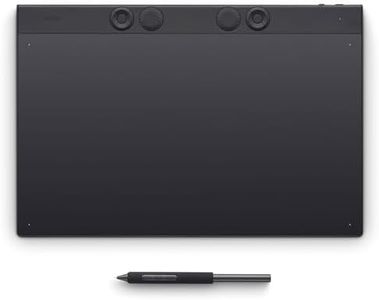
Wacom Intuos Pro Large Zeichentablett – Innovatives Grafiktablett inkl. Wacom Pro Pen 3, große Arbeitsfläche für Video-Editing, 3D-Modelling & Animation – maximale Präzision & Kontrolle für Profis
The Wacom Intuos Pro Large is a top-tier graphics tablet designed mainly for professionals working in video editing, 3D modeling, animation, and similar creative fields. It offers a large active drawing area (349 x 195 mm), which gives you plenty of space to work comfortably on detailed projects. The pen that comes with it—the Wacom Pro Pen 3—has excellent pressure sensitivity with 8,192 levels, allowing for very precise control over brush strokes and lines. This makes it ideal when subtlety and accuracy matter.
The tablet supports both USB and Bluetooth connections, providing flexible ways to connect to your computer, and it has a strong battery life of up to 16 hours, so you won’t need to recharge often while working. Its resolution of 8192 lines per inch means your pen movements translate smoothly and accurately on screen, avoiding lag or jumps. The device is also designed with comfort in mind—it’s very slim and ergonomic, suitable for both right- and left-handed users, and features customizable express keys and mechanical dials to speed up your workflow.
One potential downside is its weight (1.37 kg), which might make it less convenient if you need a very portable setup. Also, while it supports both Windows and macOS, it may require some learning to fully customize the express keys and pen buttons to your preferred settings. The price point is higher than entry-level tablets, but this matches its professional-grade build and features. The Wacom Intuos Pro Large is a solid choice if you need a reliable, precise, and comfortable tablet for demanding creative tasks, bringing decades of Wacom’s expertise together in a tool that helps professionals work efficiently and with great control over their digital art or editing projects.
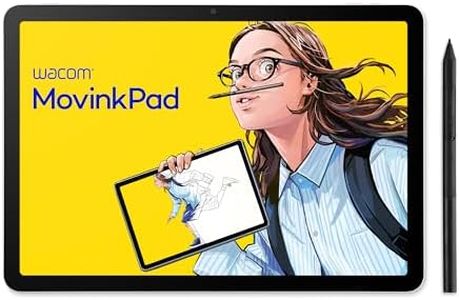
Wacom MovinkPad 11, EIN Android 14 All-in-One 11'' Zeichentablett für Junge Kreative. Mit Wacom Pro-Stift 3, einem scharfen Bildschirm, blendfreiem geätztem Glas, Front- und Rückkameras und
The Wacom MovinkPad 11 is a compact and portable graphic tablet featuring an 11-inch high-resolution screen (2200 x 1440 pixels) that offers a clear and paper-like drawing experience thanks to its anti-glare display. It includes the Wacom Pro Pen 3, which is battery-free and supports 8192 levels of pressure sensitivity plus tilt recognition, allowing for precise and natural drawing or sketching. This makes it well-suited for young creatives or anyone wanting to draw on the go without needing a computer, as it runs on Android 14 and comes with useful creative apps like Wacom Canvas and Clip Studio Paint. The tablet supports popular digital pens beyond just the included one, adding flexibility. With a decent battery life powered by a 7700-mAh battery, it can be used for extended periods.
Weighing around 588 grams, it is light enough to carry easily, though it might feel a bit bulky compared to smaller tablets. Connectivity is via USB-C, which is standard but may limit direct connection options without adapters. This tablet is a standalone, easy-to-use, and quality drawing tool that offers a good balance of features suitable for casual to semi-professional creativity, especially for sketching and illustration on the move.
Top-Auswahl vergleichen
Wacom Cintiq 24 (2025 Edition) – 2.5K Grafik-Stiftdisplay mit Wacom Pro Pen 3, verstellbarem Ständer, entspiegeltem Glas und verbesserter Farbgenauigkeit Auf Amazon ansehen | Wacom Intuos Pro Large Zeichentablett – Innovatives Grafiktablett inkl. Wacom Pro Pen 3, große Arbeitsfläche für Video-Editing, 3D-Modelling & Animation – maximale Präzision & Kontrolle für Profis Auf Amazon ansehen | Wacom MovinkPad 11, EIN Android 14 All-in-One 11'' Zeichentablett für Junge Kreative. Mit Wacom Pro-Stift 3, einem scharfen Bildschirm, blendfreiem geätztem Glas, Front- und Rückkameras und Auf Amazon ansehen |
|---|---|---|
| Angebot | ||
6%billiger | 19%billiger | 15%billiger |
| Ausgewählt von | ||
| 1.442 | 1.340 | 1.238 |
| Mehrere Stile verfügbar | ||
| Active Area | ||
| 527 x 296 mm | 349 x 195 mm | 11-inch |
| Pen Pressure Sensitivity | ||
| 8192 levels | 8192 levels | 8192 levels |
| Resolution (LPI - Lines Per Inch) | ||
| 2560x1440 | 8192 LPI | -- |
| Pen Type and Features | ||
| Pro Pen 3 | Wacom Pro Pen 3 | Wacom Pro Pen 3, battery-free, tilt |
| Connectivity | ||
| USB-C, HDMI, USB-A | Bluetooth, USB | USB-C |
| Express Keys/Shortcuts | ||
| Express keys or shortcuts | Shortcut keys | -- |