10 Beste Monitore
Von führenden Marken und Bestsellern, die im Internet erhältlich sind.
Ähnliche Produkte
Bis zu 25 % Rabatt

Unsere Top-Auswahl
Gewinner
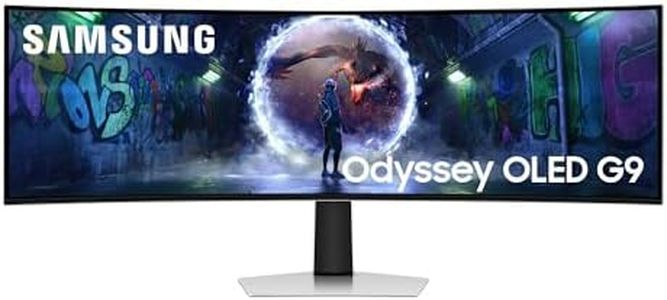
Samsung 49 Zoll Odyssey OLED G9 G93SD, DQHD (5.120 x 1.440), Gaming Monitor, PC Bildschirm, 240 Hz, OLED Glare Free, 0,03 ms Reaktionszeit, Gaming Hub, LS49DG934SUXEN
 Samsung
The Samsung Odyssey OLED G9 is a standout ultra-wide gaming monitor with a massive 49-inch curved OLED screen and an impressive Dual QHD resolution of 5120 x 1440 pixels. Its OLED panel delivers vibrant colors and deep blacks, enhancing the visual experience, while the 240 Hz refresh rate and ultra-fast 0.03 ms response time ensure smooth, blur-free gameplay, which is great for fast-paced games. The screen's matte, glare-free surface reduces reflections, making it easier to see even in bright environments. Connectivity options are solid, featuring DisplayPort, HDMI, and USB-C, allowing easy connection to PCs and consoles. Its wide 32:9 aspect ratio gives a broad, immersive view, perfect for multitasking or gaming. The monitor also includes FreeSync Premium Pro to reduce screen tearing and stuttering.
On the downside, its brightness peaks at 250 cd/m², which might feel a bit low for very bright rooms or HDR content. At nearly 13 kilograms and 120 cm wide, it requires a spacious desk and sturdy stand or wall mount to fit comfortably. While it has some ergonomic features like curvature and VESA mount support, it may lack advanced height or swivel adjustments found in some other models. The color accuracy is excellent thanks to the OLED technology, making it suitable not just for gaming but also for creative work where color fidelity matters.
This monitor suits gamers and productivity users who want a large, immersive display with smooth motion and rich colors, though its size and brightness might be considerations depending on your setup.
Dell S3422DWG 34 Zoll WQHD (3440x1440) 21:9 1800R Curved Gaming Monitor, 144Hz, VA, 1ms MPRT, AMD FreeSync Premium Pro, HDR 400, DisplayPort, 2x HDMI, 5x USB, 3 Jahre Garantie, schwarz
Der Dell S3422DWG ist ein 34 Zoll großer, gebogener Gaming-Monitor mit einem weiten 21:9-Bildformat, das besonders für Spiele und Multitasking geeignet ist. Die WQHD-Auflösung von 3440 x 1440 Pixeln liefert scharfe und detaillierte Bilder mit 34 % mehr Pixeln als herkömmliches QHD. Die VA-Panel-Technologie sorgt für kräftige Farben und einen hohen Kontrast (3000:1), was besonders dunkle und helle Bildbereiche gut darstellt. Mit einer Bildwiederholrate von 144 Hz und einer schnellen Reaktionszeit von 1 ms (MPRT) ist der Monitor gut für schnelle Spiele geeignet und bietet flüssige Bewegungen ohne störende Schlieren. AMD FreeSync Premium Pro unterstützt dabei ein ruckelfreies Spielerlebnis.
Die HDR400-Zertifizierung sorgt für bessere Farb- und Kontrastdarstellung bei kompatiblen Inhalten, was das Bild lebendiger macht. In puncto Anschlüsse ist der Monitor gut ausgestattet mit 2 HDMI-Ports, einem DisplayPort und sogar 5 USB-Ports, was vielseitige Verbindungen zu verschiedenen Geräten ermöglicht. Die Ergonomie ist aufgrund des gebogenen 1800R-Displays angenehm für die Augen, auch bei längeren Sessions. Die Farbgenauigkeit mit 90 % DCI-P3 ist ordentlich, jedoch nicht auf professionellem Niveau für Farbprofis.
Nachteile sind der VA-typisch etwas geringere Blickwinkel und die Reaktionszeit kann bei manchen schnellen Spielen minimal spürbar sein. Für Gamer, die eine immersive, breite Sicht mit guter Bildqualität und flüssigem Gameplay suchen, ist der Dell S3422DWG eine solide Wahl. Wer hingegen höchste Farbgenauigkeit oder ein IPS-Panel bevorzugt, sollte andere Modelle in Betracht ziehen.
BenQ MOBIUZ EX271UZ 27" 4K UHD QD-OLED Gaming Monitor, 240 Hz, 0,03 ms GtG, 99% DCI-P3, DisplayHDR True Black 400, 166 PPI, HDMI 2.1, DP 1.4, USB-C (90 W), FreeSync Premium Pro, hoher Pixelkontrast
The BenQ MOBIUZ EX271UZ is a 27-inch gaming monitor with a stunning 4K UHD resolution (3840 x 2160), delivering very sharp and detailed images. It uses the advanced QD-OLED panel technology, which provides excellent color quality with 99% DCI-P3 coverage and perfect blacks thanks to OLED’s self-lighting pixels. This results in vivid, lifelike colors and deep contrast, making games look especially immersive.
The monitor supports a very high refresh rate of 240 Hz and an extremely fast response time of 0.03 ms, meaning motion appears smooth and fast with hardly any blur—ideal for fast-paced gaming. It also features FreeSync Premium Pro for tear-free gameplay, enhancing the gameplay experience. In terms of connectivity, it offers several ports including HDMI 2.1, DisplayPort 1.4, and USB-C with 90W power delivery, allowing easy connection to PCs, laptops, and gaming consoles. The screen has a matte, anti-reflective surface that reduces glare and comes with eye-care technologies like flicker-free and low blue light to reduce eye strain during long gaming sessions.
The monitor’s color calibration and dynamic color profiles are designed to adapt to different game genres, improving visual storytelling. The brightness level is about 250 nits, which is decent but not very high for HDR content in bright rooms. Weighing around 7.4 kg, it is relatively easy to move but might need a good desk setup. This monitor is well suited to gamers seeking a premium, visually rich 4K experience with ultra-smooth performance, though it comes at a higher price compared to standard monitors.
Top-Auswahl vergleichen
Samsung 49 Zoll Odyssey OLED G9 G93SD, DQHD (5.120 x 1.440), Gaming Monitor, PC Bildschirm, 240 Hz, OLED Glare Free, 0,03 ms Reaktionszeit, Gaming Hub, LS49DG934SUXEN Auf Amazon ansehen | Dell S3422DWG 34 Zoll WQHD (3440x1440) 21:9 1800R Curved Gaming Monitor, 144Hz, VA, 1ms MPRT, AMD FreeSync Premium Pro, HDR 400, DisplayPort, 2x HDMI, 5x USB, 3 Jahre Garantie, schwarz Auf Amazon ansehen | BenQ MOBIUZ EX271UZ 27" 4K UHD QD-OLED Gaming Monitor, 240 Hz, 0,03 ms GtG, 99% DCI-P3, DisplayHDR True Black 400, 166 PPI, HDMI 2.1, DP 1.4, USB-C (90 W), FreeSync Premium Pro, hoher Pixelkontrast Auf Amazon ansehen |
|---|---|---|
| Angebot | ||
| - | - | 40%billiger |
| Ausgewählt von | ||
| 1.483 | 1.381 | 1.279 |
| Mehrere Stile verfügbar | ||
| Screen Size | ||
| 49 inches | 34 Zoll | 27 Zoll |
| Resolution | ||
| 5120 x 1440 | 3440 x 1440 | 3840 x 2160 |
| Panel Type | ||
| OLED | VA | QD-OLED |
| Refresh Rate | ||
| 240 Hz | 144 Hz | 240 Hz |
| Response Time | ||
| 0.03 ms | 1 ms (MPRT) | 0.03 ms |
| Connectivity Ports | ||
| DisplayPort, HDMI, USB-C | 2 HDMI, 1 DP, 5 USB | HDMI 2.1, DP 1.4, USB-C 90W |
| Ergonomics | ||
| Curved, VESA mount support | Gebogen 1800R | -- |
| Color Accuracy | ||
| -- | 90 % DCI-P3 | 99% DCI-P3 coverage |