10 Beste Monitore Für Mac
Von führenden Marken und Bestsellern, die im Internet erhältlich sind.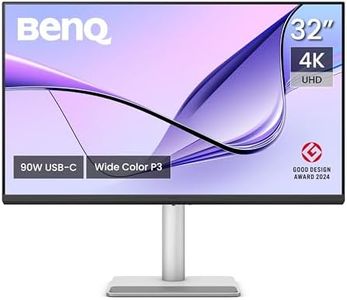

Ähnliche Produkte
Bis zu 26 % Rabatt


Unsere Top-Auswahl
Gewinner
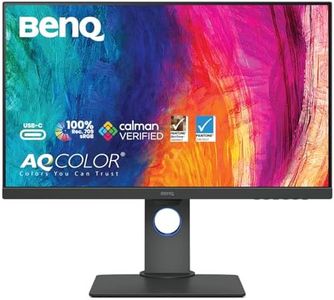
BenQ MA320U 32 Zoll 4K 3840x2160 Monitor für MacBook Pro/Air, Dual USB-C, 90W-Stromversorgung, Mac Color Match, USB-Hub, Helligkeits- und Lautstärkeregelung auf Mac, Verstellbarer Fuß, P3-Farbraum

Der BenQ MA320U ist ein 32 Zoll großer 4K-Monitor (3840 x 2160 Pixel), der besonders für MacBook Pro und Air Nutzer entwickelt wurde. Sein LED-Panel bietet einen matten Bildschirm mit guter Farbwiedergabe im dynamischen P3-Farbraum, der für Mac-Geräte optimiert ist. Das sorgt für sehr präzise und lebendige Farben, was vor allem für kreative Arbeiten wie Bild- und Videobearbeitung wichtig ist. Die Bildwiederholrate liegt bei standardmäßigen 60 Hz, was für die meisten Anwendungen ausreichend ist, aber weniger geeignet, wenn du schnelle Spiele bevorzugst. Mit einer Helligkeit, die sich dank Brightness Sync gut anpasst, und einem Antireflexionsschirm ist das Arbeiten auch in helleren Umgebungen angenehm.
Beim Anschluss punktet der Monitor mit zwei USB-C-Ports, die neben der Signalübertragung auch Strom liefern (bis zu 90 Watt), sodass dein MacBook mit nur einem Kabel geladen und verbunden werden kann. Zusätzlich gibt es zwei HDMI-Eingänge und einen integrierten USB-Hub, der weitere Geräte unterstützt. Die ergonomischen Einstellungen sind komfortabel: Der Fuß lässt sich in Höhe, Neigung, Drehung und Schwenkung anpassen, was lange Arbeitstage erleichtert. Ein besonderes Extra ist die Möglichkeit, Helligkeit und Lautstärke direkt über die MacBook-Tastatur zu steuern – eine praktische Funktion für Mac-Nutzer.
Der Monitor hat eine Reaktionszeit von 5 ms und ein Kontrastverhältnis von 2000:1, was für klare Bilder sorgt, aber bei sehr schnellen Bewegungen oder dunklen Szenen keine Profi-Gaming-Qualität erreicht. Der BenQ MA320U eignet sich hervorragend für Mac-Nutzer, die Wert auf Farbgenauigkeit, eine hohe Auflösung und einfache Anschlussmöglichkeiten legen, insbesondere im kreativen Bereich. Für schnelle Spiele hingegen könnte das 60-Hz-Panel mit der Reaktionszeit an seine Grenzen stoßen.
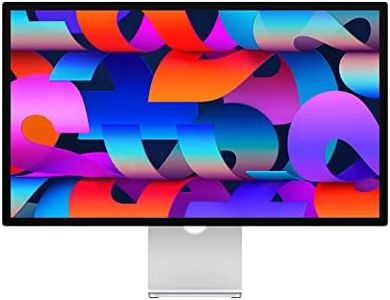
Apple Studio Display – Standardglas – neigungsverstellbarer Standfuß (2025)
Das Apple Studio Display ist ein 27 Zoll großer Monitor, der perfekt für Mac-Nutzer entwickelt wurde, die Wert auf eine sehr hohe Bildqualität legen. Mit seiner beeindruckenden 5K Retina Auflösung (5123 x 2880 Pixel) liefert es extrem scharfe und detailreiche Bilder. Der große P3 Farbraum und die Unterstützung für eine Milliarde Farben gewährleisten eine hervorragende Farbgenauigkeit, was besonders für kreative Arbeiten wie Fotobearbeitung oder Design wichtig ist. Die Helligkeit von 600 Nits sorgt selbst in helleren Umgebungen für klare Sicht. Die Bildwiederholrate liegt bei 60 Hz, was für die meisten Anwendungsfälle am Mac völlig ausreichend ist, auch wenn es nicht für Gaming optimiert ist. Das Display nutzt ein hochwertiges Panel, das zusammen mit der schnellen Reaktionszeit von 1 Millisekunde für eine flüssige und präzise Darstellung sorgt.
Praktisch sind die Anschlussmöglichkeiten: Ein Thunderbolt 3 Anschluss und drei USB-C Ports bieten vielseitige Verbindungen und laden gleichzeitig MacBooks mit bis zu 96 Watt auf. Der ergonomisch neigungsverstellbare Standfuß erlaubt eine bequeme Anpassung der Blickwinkel, allerdings fehlt eine Höhenverstellung. Zusätzliche Features wie die 12 MP Ultraweitwinkel-Kamera mit Center Stage, das hochwertige Mikrofon-Array und das 6-Lautsprecher-System mit 3D-Audio verbessern die Videoanruf- und Multimedia-Erfahrung deutlich. Der Preis ist für ein reines Monitorprodukt recht hoch, besonders wenn man keine dieser Extras benötigt. Dieses Display eignet sich ideal für professionelle Anwender, die besonders auf Farbtreue und Bildqualität setzen und ihr Mac-Setup erweitern möchten, während es weniger geeignet ist für Nutzer, die vor allem eine preiswerte Anzeige für einfache Aufgaben suchen.
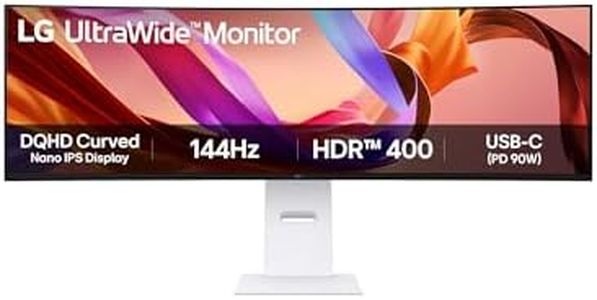
LG UltraWide 49U950A-W.AEU (49 Zoll) 32:9 Curved DQHD Nano IPS Monitor, 144Hz, AMD FreeSync™ Premium, DisplayHDR™ 400, USB-C (90W), Weiß
The LG UltraWide 49U950A-W.AEU is a large 49-inch curved monitor with a sharp 5120 x 1440 DQHD resolution, providing significantly more screen space than two standard Full HD monitors side-by-side. Its Nano IPS panel delivers vivid and accurate colors with 98% DCI-P3 coverage, making it a solid choice for creative professionals or Mac users who require color precision. The screen is bright at 400 nits and supports HDR400, enhancing image dynamics, although it does not offer the highest level of HDR available.
With a 144Hz refresh rate and AMD FreeSync Premium Pro technology, the monitor performs well for smooth motion, benefiting gaming or video work. Its connectivity options are versatile, including HDMI 2.1, DisplayPort 1.4, USB-C with 90W power delivery, and multiple USB-A ports, allowing easy connection to Macs and other devices without extra adapters. The built-in KVM switch and picture-by-picture modes enable convenient multitasking with two computers, ideal for professional workflows.
Ergonomically, the monitor offers height and tilt adjustments but lacks swivel or pivot. The glossy screen surface may cause reflections in bright rooms, and the 5ms response time is adequate for most uses, though not the fastest for competitive gaming. This monitor is well-suited for Mac users seeking a spacious, color-accurate, and flexible display for creative work, business, or casual gaming, though it may be too large for small desks and less ideal for those who prefer a matte screen.
Top-Auswahl vergleichen
BenQ MA320U 32 Zoll 4K 3840x2160 Monitor für MacBook Pro/Air, Dual USB-C, 90W-Stromversorgung, Mac Color Match, USB-Hub, Helligkeits- und Lautstärkeregelung auf Mac, Verstellbarer Fuß, P3-Farbraum Auf Amazon ansehen | LG UltraWide 49U950A-W.AEU (49 Zoll) 32:9 Curved DQHD Nano IPS Monitor, 144Hz, AMD FreeSync™ Premium, DisplayHDR™ 400, USB-C (90W), Weiß Auf Amazon ansehen | |
|---|---|---|
| Angebot | ||
15%billiger | - | 11%billiger |
| Ausgewählt von | ||
| 1.377 | 1.275 | 1.173 |
| Mehrere Stile verfügbar | ||
| Screen Size | ||
| 31,5 Zoll | 27 Zoll | 49 Zoll |
| Resolution | ||
| 3840 x 2160 | 5123 x 2880 Pixel | 5120 x 1440 |
| Panel Type | ||
| LED | hochwertiges Panel | Nano IPS |
| Connectivity | ||
| HDMI, DisplayPort, USB-C | Thunderbolt 3, 3 USB-C Ports | HDMI 2.1, DP 1.4, USB-C 90W |
| Color Accuracy | ||
| P3-Farbraum | großer P3 Farbraum, 1 Milliarde Farben | 98% DCI-P3 |
| Refresh Rate | ||
| 60 Hz | 60 Hz | 144 Hz |
| Ergonomics | ||
| Höhe, Neigung, Drehung, Schwenkung | neigungsverstellbarer Standfuß | Height and tilt adjustments |
| Brightness | ||
| -- | 600 Nits | 400 nits |