Einkaufsleitfaden für die besten Roku Fernseher
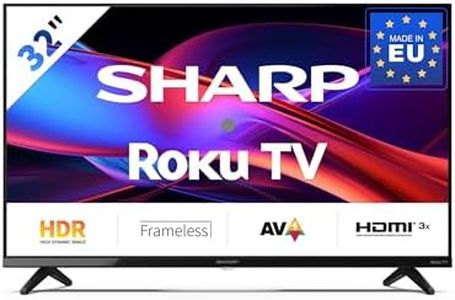
Buying a Roku TV is a great choice if you want simple access to streaming services and a user-friendly smart TV experience. When you’re shopping, think about how and where you’ll use the TV—are you looking for something for movie nights in a large living room, or just some casual viewing in a bedroom? The most important factors relate to picture quality, sound, size, and ease of use. Let your own viewing habits guide your choices: Are you mostly watching HD content, do you care about gaming, or do you want the TV to blend right into your décor? Each feature affects how satisfied you’ll be with your Roku TV, so the best approach is to learn what matters most and choose based on your own preferences and the environment where the TV will be installed.Screen SizeScreen size refers to the diagonal length of the TV screen, usually measured in inches. The right size depends on the room where you’ll place your Roku TV and how far you’ll sit from the screen. Generally, smaller sizes (like 32 to 43 inches) are good for bedrooms, kitchens, or small spaces. Medium sizes (50 to 65 inches) suit living rooms and shared spaces, providing an immersive experience without being overwhelming. Larger TVs (above 70 inches) are for big rooms and serious movie nights. To pick the right size for you, think about your room’s size and measure the distance from where you’ll sit; a common rule is to sit about 1.5 to 2.5 times the TV's diagonal size away from it.
ResolutionResolution tells you how many pixels make up the picture on the screen. Most TVs today are at least Full HD (1920x1080), while 4K (3840x2160) is considered standard for mid- to large-size models. Higher resolution means clearer, sharper images, especially noticeable on bigger screens. For casual viewing or small screens, Full HD may be enough. For movies, gaming, or larger screens, 4K offers noticeably sharper and more detailed visuals. Choose the resolution that fits what you watch—if you want the best clarity for streaming, sports, and movies, go for 4K; if you’ll mostly watch regular TV shows on a smaller screen, Full HD is perfectly fine.
Display TypeDisplay type refers to the technology your TV uses to produce an image. Most Roku TVs use LED panels, which are reliable and energy efficient. Some models offer QLED or other improved LED technologies for brighter colors and better contrast. Plain LED is enough for general purposes and well-lit rooms. QLED and other enhancements are better if you care about vivid colors or watch a lot of movies at night. If you want the best picture possible and deeper blacks, pick a Roku TV with advanced LED tech. Otherwise, standard LED is a safe, budget-friendly choice.
Smart FeaturesSmart features are what make Roku TVs stand out—they provide easy access to streaming apps, voice control, and user-friendly menus. All Roku TVs offer the basic Roku experience, but some include extras like built-in voice assistants, enhanced remote controls, or compatibility with smart homes. If you want to use voice search or control the TV with your phone, look for those features. For simple viewing, basic Roku functionality should be enough. Choose extras based on how much control and convenience you want in your day-to-day usage.
Refresh RateRefresh rate is the number of times per second the screen updates its image, usually measured in Hertz (Hz). Common refresh rates are 60Hz, which is sufficient for most TV shows and movies, and 120Hz, which is smoother and better for fast action or gaming. If you aren’t gaming or watching lots of sports, 60Hz is fine. If you want super-smooth motion for games or action movies, look for a higher refresh rate. Pick based on what you’ll be watching: for everyday use, 60Hz is acceptable; for fluid motion in games or sports, 120Hz is best.
Inputs and ConnectivityInputs and connectivity refer to the physical ports and wireless options your Roku TV offers for connecting other devices, like game consoles, soundbars, or streaming sticks. Look at how many HDMI ports are available—three or more is ideal if you have multiple devices. Also check for USB, optical audio, and Wi-Fi/Bluetooth support. If you have lots of add-ons, make sure the TV has enough connections. If you just stream content, fewer ports may suffice. Think about your current and future devices to be sure your TV will fit your setup.
Audio QualityAudio quality is how well the built-in speakers sound. Some TVs include basic speakers that work fine for casual viewing, while others have enhanced sound features or support for external soundbars. If you want rich sound for movies and music, look for advanced sound technologies or consider adding a soundbar. For normal TV watching (news, sitcoms), basic audio is usually enough. Choose based on what you watch most and how much of a priority good sound is for you.