10 Beste Scanner
Von führenden Marken und Bestsellern, die im Internet erhältlich sind.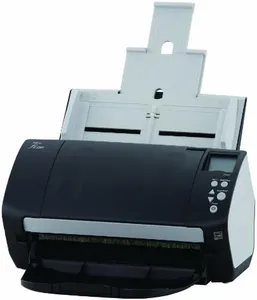
Ähnliche Produkte
Bis zu 19 % Rabatt
Empfohlene Listen

Dia Scanner
Unsere Top-Auswahl
Gewinner
Fujitsu FI-7160 Pro Scanner mit automatischer Zuführung 60ppm / 120ipm intelligenter Papierschutz (Generalüberholt)

The Fujitsu FI-7160 is a solid choice for people who need a reliable document scanner for everyday office tasks. It offers a scan resolution of 300 DPI, which is good enough for clear text and basic images. The scanner handles documents up to standard sizes and has a fast scan speed of 60 pages per minute (ppm) or 120 images per minute (ipm) in duplex mode, meaning it scans both sides of a page automatically. This makes it great for quickly digitizing large batches of papers. Its automatic document feeder (ADF) can hold up to 80 sheets, helping save time by scanning many pages without needing constant attention.
The scanner supports USB connection, which is simple and widely compatible, though it lacks wireless options. It works well with Windows 10 or newer and macOS 10.14 or newer, covering most users’ computer systems. One convenient feature is the ability to scan multiple smaller documents like business cards at once. The scanner operates quietly and uses LED lighting with CCD sensor technology for clear images. On the downside, the device weighs over 9 pounds, so it’s less portable, and it doesn’t have built-in wireless connectivity, which some might miss for modern office flexibility. Also, the color depth is limited, meaning it’s mainly suited for black-and-white or simple color scans rather than high-quality photo scanning.
Being a refurbished model with a one-year limited warranty, it's a budget-friendly option but buyers should consider that it may not have the latest features found in brand-new scanners. The FI-7160 is well suited for small to medium offices or individuals needing a fast, dependable scanner without advanced extras.
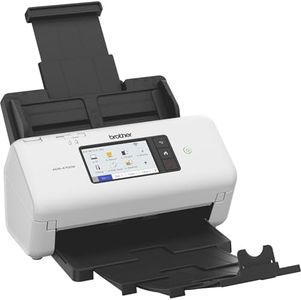
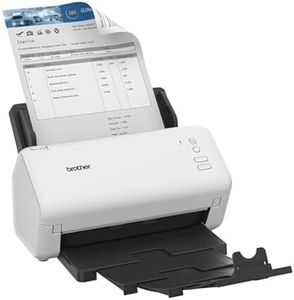
Brother ADS-4700W, Professioneller Dokumentenscanner mit USB, LAN und WLAN, Duplex Scan, Touchscreen, ADS4700WRE1, Weiß
Der Brother ADS-4700W ist ein professioneller Dokumentenscanner, der besonders für Büros oder Anwender mit hohem Scanaufkommen gut geeignet ist. Mit einer Scan-Geschwindigkeit von bis zu 40 Seiten pro Minute und einem automatischen Dokumenteneinzug für bis zu 80 Blätter bietet er effizientes Arbeiten und spart Zeit bei mehrseitigen Dokumenten. Die Duplex-Funktion ermöglicht das beidseitige Scannen in einem Durchgang, was praktisch ist, wenn viele doppelseitige Seiten verarbeitet werden sollen.
Die Anschlussmöglichkeiten sind vielfältig: USB 3.0, LAN und WLAN sorgen für flexible Verbindungen zu verschiedenen Geräten. Auch die NFC-Authentifizierung für mehr Sicherheit ist dabei, was den Scanner für professionelle Umgebungen interessant macht. Das 10,9 cm große Farb-Touchdisplay mit anpassbaren Favoriten erleichtert die Bedienung und macht die Steuerung intuitiv. Unterstützt werden gängige Betriebssysteme wie Windows, Mac und Linux, und das Scanner-Kit wird mit einem professionellen Softwarepaket ausgeliefert, das unter anderem die PDF-Erstellung erleichtert.
Der Scanner wiegt vergleichsweise 2 kg, was die mobile Nutzung einschränkt. Die Energieaufnahme beträgt 26 Watt und ist angemessen. Wer einen zuverlässigen Scanner für den professionellen Einsatz mit schneller Verarbeitung großer Dokumentenmengen und vielseitigen Verbindungsmöglichkeiten benötigt, findet im Brother ADS-4700W eine passende Lösung. Für gelegentlichen Heimgebrauch oder mobile Einsätze gibt es allerdings leichtere und einfachere Alternativen.
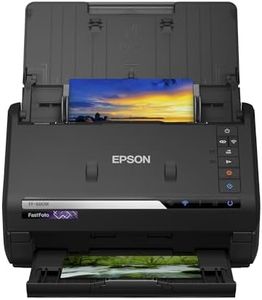
Epson FastFoto FF-680W Scanner (scannt 10 x 15 Foto in einer Sekunde, bis DIN A4, beidseitiger Scan, automatische Ausrichtung, Zuschnitt und Optimierung, Bilder einfach speichern)
The Epson FastFoto FF-680W is designed primarily for quickly scanning a large number of photos, making it ideal if you want to digitize old photo collections efficiently. It scans at up to 600 dpi, which is good enough for clear photo reproduction, and can handle up to 30 photos in a batch, scanning a 10 x 15 cm photo in about one second. The built-in automatic document feeder (ADF) supports up to 30 sheets, saving you from scanning images one by one. It also offers duplex scanning, so you can scan both sides of documents or photos automatically. The scanner connects via USB or Wi-Fi, giving you flexible options to link it to your computer. It supports common file formats like JPEG and TIFF, allowing you to choose smaller files for sharing or high-quality files for archiving.
The included software automatically crops, straightens, and enhances photos, which helps simplify the scanning process, especially if you’re not comfortable with editing images yourself. The scanner scans up to A4 size but is especially designed for photos, so it might not be the best fit if you need to scan large documents frequently. The scanner is also relatively bulky and weighs 3.7 kg, so it’s less portable. Compatibility is limited to certain Windows and macOS versions, so make sure your system meets the requirements.
If fast, easy photo scanning with basic document support is your main goal, this Epson model delivers a solid balance of speed, quality, and smart features.
Top-Auswahl vergleichen
Fujitsu FI-7160 Pro Scanner mit automatischer Zuführung 60ppm / 120ipm intelligenter Papierschutz (Generalüberholt) Auf Amazon ansehen | Brother ADS-4700W, Professioneller Dokumentenscanner mit USB, LAN und WLAN, Duplex Scan, Touchscreen, ADS4700WRE1, Weiß Auf Amazon ansehen | Epson FastFoto FF-680W Scanner (scannt 10 x 15 Foto in einer Sekunde, bis DIN A4, beidseitiger Scan, automatische Ausrichtung, Zuschnitt und Optimierung, Bilder einfach speichern) Auf Amazon ansehen |
|---|---|---|
| Angebot | ||
75%billiger | 21%billiger | 24%billiger |
| Ausgewählt von | ||
| 1.482 | 1.380 | 1.278 |
| Mehrere Stile verfügbar | ||
| Scan Resolution (DPI) | ||
| 300 | -- | 300, 600 dpi |
| Scan Size | ||
| standard sizes | -- | up to A4 |
| Scan Speed | ||
| 60 ppm or 120 ipm duplex | 40 Seiten pro Minute | 1 second per 10x15 cm photo |
| Automatic Document Feeder (ADF) | ||
| 80 sheets | 80 Blätter | 30 sheets |
| Duplex Scanning | ||
| yes | ja | yes |
| Connection Type | ||
| USB | USB 3.0, LAN, WLAN | USB, Wi-Fi |
| Software Compatibility | ||
| Windows 10+, macOS 10.14+ | Windows, Mac, Linux | Windows 7/8/10, Mac OS X 10.11-10.13 |
| Supported File Formats | ||
| -- | -- | JPEG, TIFF |