10 Beste 35 Mm Diascanner
Von führenden Marken und Bestsellern, die im Internet erhältlich sind.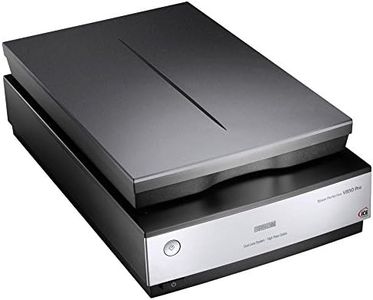
Ähnliche Produkte
Bis zu 31 % Rabatt
Empfohlene Listen

Dia Scanner

Scanner

Dia-scanners
Unsere Top-Auswahl
Gewinner
Epson Perfection V850, professioneller Fotoscanner, Scanner zum Digitalisieren von Fotos, Vorlagen, Dias und Negativen, Flachbettscanner mit hoher Auflösung, schwarz/silber

Der Epson Perfection V850 ist ein hochwertiger Flachbettscanner, der besonders für das Digitalisieren von Dias, Negativen und Fotos geeignet ist. Mit einer sehr hohen optischen Auflösung von bis zu 6400 dpi für Filmformate liefert er detailreiche und scharfe Scans, was für Hobbyfotografen und Profis interessant ist, die ihre analogen Bilder in bester Qualität archivieren möchten. Die Farbtiefe von 48 Bit sorgt für eine sehr feine Farbabstufung und realistische Farbdarstellung. Die Scanzeit ist dank der ReadyScan LED-Technologie relativ kurz, da kein Aufwärmen nötig ist – das spart Zeit und Energie. Besonders praktisch ist die DIGITAL ICE-Technologie, die automatisch Staub und Kratzer auf den Filmvorlagen entfernt und so die Nachbearbeitung am Computer reduziert. Der Scanner kann Medien bis zu einer Größe von etwa DIN A4 verarbeiten, was vielseitige Einsatzmöglichkeiten bietet.
Allerdings ist das Gerät mit rund 6,6 Kilogramm recht schwer und mit USB 2.0 etwas älter in der Anschlussart, was bei großen Dateien die Übertragung etwas verlangsamen kann. Die mitgelieferte Software ist solide, aber keine High-End-Lösung, was für gelegentliche Anwender aber ausreichend sein dürfte. Nutzer, die Fotos und Dias mit sehr guter Bildqualität und zuverlässiger Staub- und Kratzerkorrektur digitalisieren möchten, finden im Epson Perfection V850 einen leistungsfähigen Scanner. Für Anwender, die sehr schnelle Scans oder modernere Anschlüsse erwarten, könnte das Gerät dagegen weniger attraktiv sein.
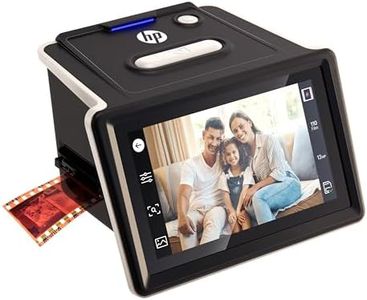
HP FilmScan Touchscreen-Film- und Diascanner mit 5-Zoll-LCD-Bildschirm, wandelt Negative und Dias schnell in Digitale 22-MP-JPEG-Fotos um, kompatibel mit 135er-, 126er- und 110er-Filmen und -Dias
Der HP FilmScan Touchscreen-Film- und Diascanner ist eine praktische Lösung für alle, die ihre 35-mm-Filme und Dias schnell und einfach digitalisieren möchten. Mit einer hohen optischen Auflösung von 3456 dpi sorgt er für scharfe und detailreiche Bilder. Die Farbtiefe von 24 Bit garantiert lebendige und natürliche Farben, sowohl bei Farb- als auch bei Schwarzweißfilmen. Besonders angenehm ist der große 5-Zoll-Touchscreen, der eine schnelle Vorschau und einfache Bearbeitung wie Helligkeits- oder Farbanpassungen direkt am Gerät ermöglicht.
Das vereinfachte Filmeinlegesystem unterstützt verschiedene Filmformate (135, 110, 126) und montierte Dias, was dem Nutzer viel Flexibilität bietet. Die integrierte automatische Bildbearbeitung mit Zuschnittfunktion erleichtert die Handhabung zusätzlich. Das Schnellladefach unterstützt einen zügigen Arbeitsfluss. Die Verbindung erfolgt über USB, was die Nutzung mit modernen Windows- und macOS-Systemen ermöglicht.
Das Gerät eignet sich besonders für Einsteiger und Hobbyfotografen, die eine unkomplizierte, benutzerfreundliche Lösung für die Digitalisierung ihrer Filmsammlung suchen, ohne tief in technische Details einzutauchen.
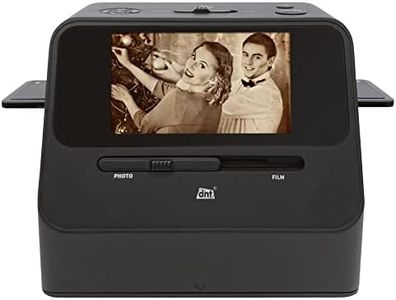
DNT 4-in-1 Kombi-Scanner SlideCopy PRO, 14 MP, Bildscanner, Fotos, Dias, Negative, Akkubetrieb, speichert auf SD-Karte, DNT000015
The DNT 4-in-1 Kombi-Scanner SlideCopy PRO is a versatile device aimed at users wanting to digitize various types of photos, negatives, and slides without needing a computer. It supports multiple photo sizes and can scan 35mm film strips (types 135, 110, and 126) plus mounted slides up to 3.2 mm thick. With an optical resolution of up to 3200 dpi and 24-bit color depth, it provides decent image quality suitable for most home archiving or casual use.
The scanner saves images directly to an SD card (up to 32 GB), making it easy to use on the go, thanks to its battery operation. Its LED light source and CMOS sensor enable relatively fast scans. Connectivity options include USB and HDMI, giving some flexibility in how you view or transfer your scans. However, it lacks advanced dust and scratch removal features, which may require manual touch-ups after scanning. The software requirements are minimal, supporting Windows 7 and newer.
While this model may not satisfy professional photographers or those needing ultra-high-quality scans, it is well suited for hobbyists and those wanting a straightforward, all-in-one scanner for a variety of film and photo formats.
Top-Auswahl vergleichen
Epson Perfection V850, professioneller Fotoscanner, Scanner zum Digitalisieren von Fotos, Vorlagen, Dias und Negativen, Flachbettscanner mit hoher Auflösung, schwarz/silber Auf Amazon ansehen | HP FilmScan Touchscreen-Film- und Diascanner mit 5-Zoll-LCD-Bildschirm, wandelt Negative und Dias schnell in Digitale 22-MP-JPEG-Fotos um, kompatibel mit 135er-, 126er- und 110er-Filmen und -Dias Auf Amazon ansehen | DNT 4-in-1 Kombi-Scanner SlideCopy PRO, 14 MP, Bildscanner, Fotos, Dias, Negative, Akkubetrieb, speichert auf SD-Karte, DNT000015 Auf Amazon ansehen |
|---|---|---|
| Angebot | ||
| - | - | - |
| Ausgewählt von | ||
| 1.270 | 1.168 | 1.066 |
| Mehrere Stile verfügbar | ||
| Optical Resolution (DPI) | ||
| up to 6400 dpi | 3456 dpi | 3200 dpi x 700 dpi |
| Colour Depth | ||
| 48 Bit | 24 Bit | 24 bpp |
| Dust and Scratch Removal | ||
| DIGITAL ICE | automatische Bildbearbeitung mit Zuschnitt | No advanced dust or scratch removal |
| Film Holder and Compatibility | ||
| Film formats up to DIN A4 | unterstützt 135, 110, 126 Filmformate | 35mm strips, slides up to 3.2mm |
| Software and Connectivity | ||
| USB 2.0 | USB, Windows 10+, macOS 10.15+ | Windows 7+, USB, HDMI |